Everything you need to know about Assassin’s Creed Black Flag Resynced controls setup for Keyboard and Mouse, and Controllers: settings, keybindings, customizations, tips and tricks.
How to access and customize Keybinds
You’re able to customize almost all of the inputs on the PC for Mouse and Keyboard. If you’re using a controller, the game gives you the option to remap the default scheme as well.
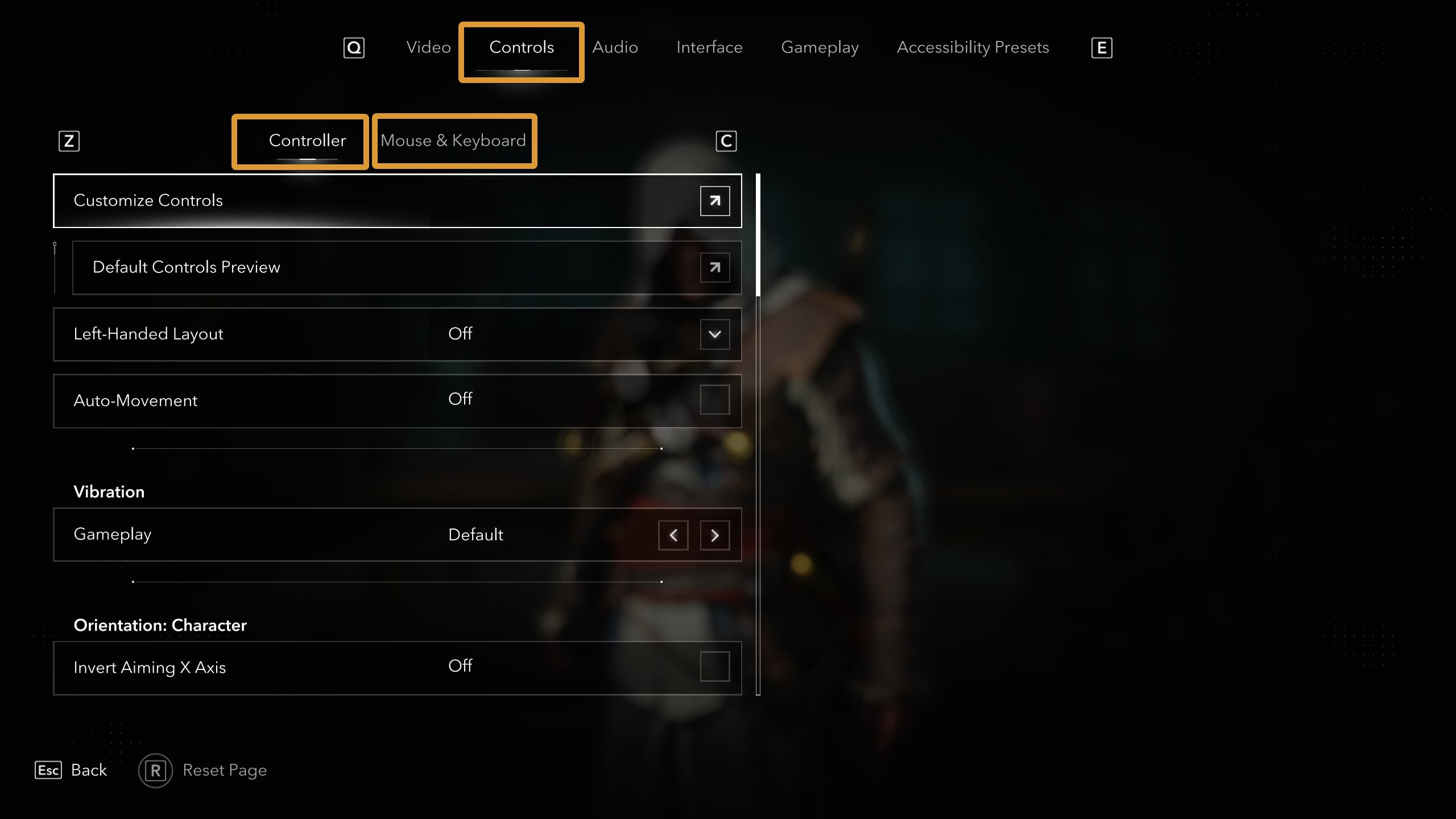
To view and modify settings for the Controls in the game, open the main menu and navigate to the Controls tab. From there, you can select either Controller or Mouse & Keyboard buttons to see the specific sections.
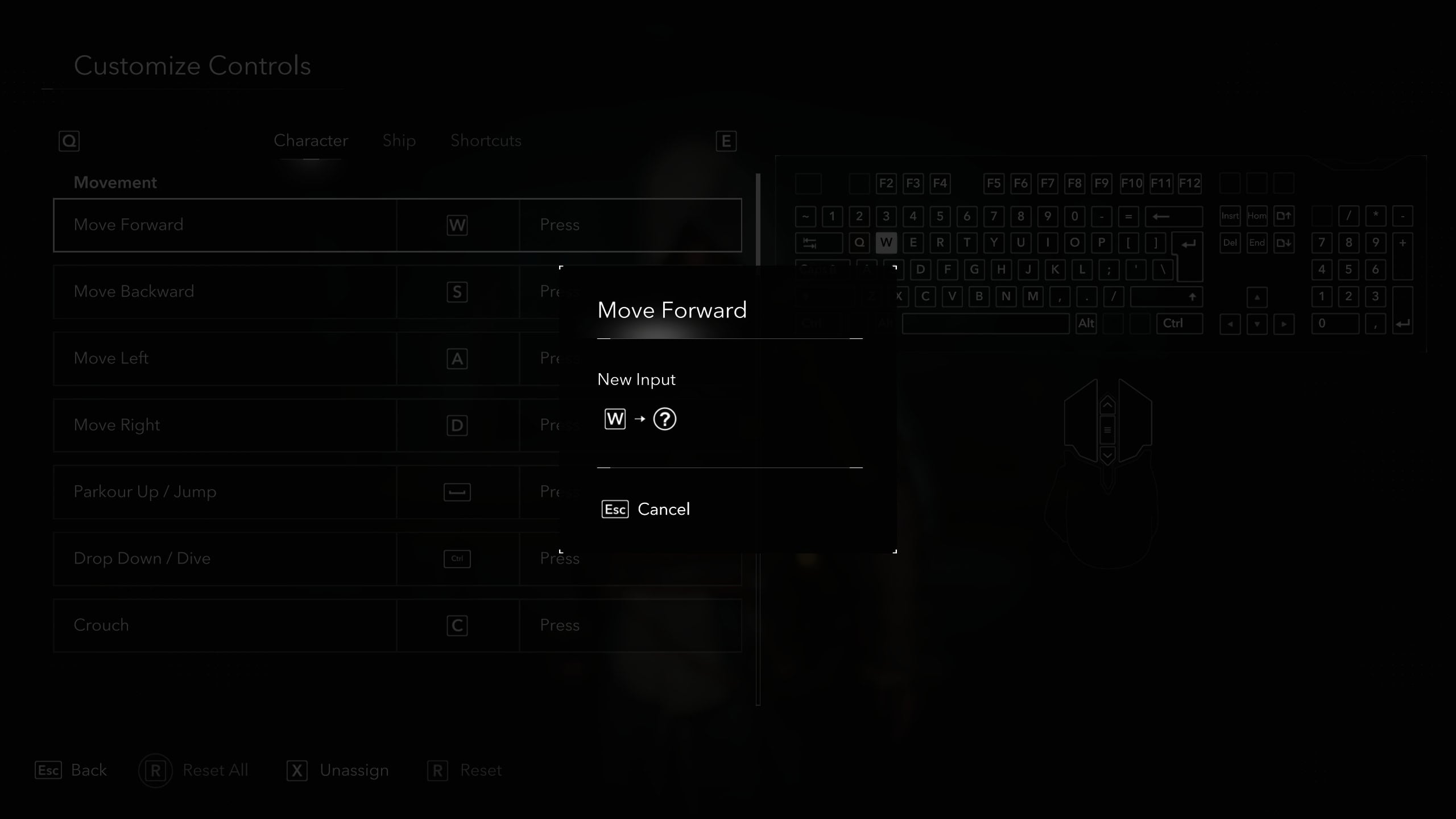
To customize a keybind, click on the button to remap it to whatever you want. A pop-up will appear asking you for a new keybind.
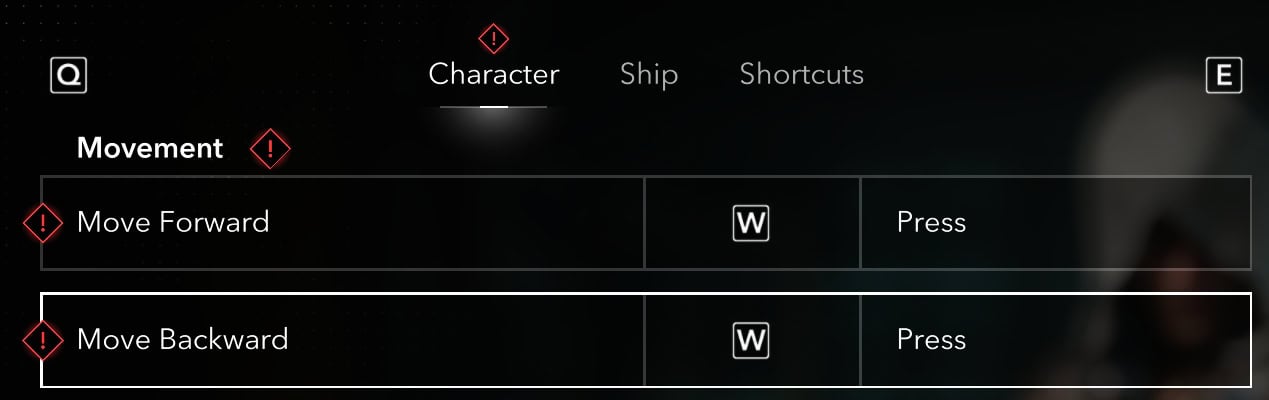
If the game detects a duplicate keybind, you will see a notification in the top right corner and a helpful red exclamation mark on the problematic keybinding slots.
PC Keyboard and Mouse Controls
Black Flag Resynced has excellent support for mouse and keyboard on PC. This continues the tradition of previous titles in the series.
To view or customize your keybinds on PC with keyboard and mouse, navigate to the Controls tab, select your preferred configuration at the top and click on “Customize Controls”. This should be the button on the first row.
Inside the Customize Controls screen, you can view the Character, Ship, and Shortcut controls separately.
Character Controls
This screen shows the available controls for movement, combat, and actions available while you’re controlling Edward on foot.
| Action | Button | Input | Type | |
|---|---|---|---|---|
| Move Forward | W | Press | Movement | Character |
| Move Backward | S | Press | Movement | Character |
| Move Left | A | Press | Movement | Character |
| Move Right | D | Press | Movement | Character |
| Parkour Up / Jump | Space | Press | Movement | Character |
| Drop Down / Dive | Ctrl | Press | Movement | Character |
| Crouch | C | Press | Movement | Character |
| Sprint | Shift | Toggle | Movement | Character |
| Walk | Ctrl | Hold | Movement | Character |
| Auto Movement | B | Press | Movement | Character |
| Attack | LMB | Combined | Combat | Character |
| Assassinate | F | Press | Combat | Character |
| Lock Target | MMB | Press | Combat | Character |
| Parry / Deflect | Q | Press | Combat | Character |
| Dodge / Roll | Alt | Press | Combat | Character |
| Human Shield | E | Press | Combat | Character |
| Takedown | E | Press | Combat | Character |
| Aim / Ranged Abilities | RMB | Hold | Combat | Character |
| — Shoot / Use Tool | LMB | Press | Combat | Character |
| — Pistol Reload | R | Press | Combat | Character |
| — Pistols | 1 | Press | Combat | Character |
| — Rope Dart | 2 | Press | Combat | Character |
| — Smoke Bomb | 3 | Press | Combat | Character |
| — Blow Pipe | 4 | Press | Combat | Character |
| Kick | 1 | Press | Combat | Character |
| Sweep | 2 | Press | Combat | Character |
| Quick Use Pistols | 3 | Press | Combat | Character |
| Quick Use Rope Dart | 4 | Press | Combat | Character |
| Interact | E | Combined | Actions | Character |
| Location Tracker | Tab | Press | Actions | Character |
| Eagle Vision | V | Hold | Actions | Character |
| Heal | Z | Press | Actions | Character |
| Pathfinder | Z | Hold | Actions | Character |
| Quick Use Smoke Bomb | G | Press | Actions | Character |
| Throw Coins | G | Hold | Actions | Character |
| Whistle | X | Press | Actions | Character |
| Advance Time | X | Hold | Actions | Character |
| Toggle Hood | T | Press | Actions | Character |
| Sheathe / Unsheathe Weapon | T | Hold | Actions | Character |
You can change the Walking speed from a slider located in the main window for Mouse & Keybind, but the default value of 5 is close enough to a normal strolling pace. Auto-Movement only makes your character go forward, It does not follow paths or the Pathfinder lines.
Human Shield is only available when someone is aiming to shoot at you. You can grab a standard enemy to take the shot for you, slitting their throat afterwards regardless if they’ve been shot or not.
Ship Controls
Under most circumstances, these controls will be used when piloting the Jackdaw, Edward Kenway’s brig.
| Action | Button | Input | Type | |
|---|---|---|---|---|
| Raise Sails | W | Press | Movement | Ship |
| Lower Sails | S | Combined | Movement | Ship |
| Steer Left | A | Press | Movement | Ship |
| Steer Right | D | Press | Movement | Ship |
| Aim Primary Weapon | RMB | Hold | Combat | Ship |
| — Fire Primary Weapon | LMB | Press | Combat | Ship |
| — Secondary Firing Mode | E | Press | Combat | Ship |
| Aim Mortar | Q | Hold | Combat | Ship |
| Use Swivel Gun | Shift | Hold | Combat | Ship |
| Ramming Ability | R | Press | Combat | Ship |
| Brace | Space | Hold | Combat | Ship |
| Interact | E | Combined | Actions | Ship |
| Pathfinder | Z | Hold | Actions | Ship |
| — Follow Sea | E | Hold | Actions | Ship |
| Location Tracker | Tab | Press | Actions | Ship |
| Toggle Shanties | V | Combined | Actions | Ship |
| Shanty Wheel | C | Hold | Actions | Ship |
| — Cycle Shanty Wheel Left | MMB Scroll Up | Press | Actions | Ship |
| — Cycle Shanty Wheel Right | MMB Scroll Down | Press | Actions | Ship |
| Spyglass | F | Toggle | Actions | Ship |
| — Spyglass Zoom In | MMB Scroll Up | Press | Actions | Ship |
| — Spyglass Zoom Out | MMB Scroll Down | Press | Actions | Ship |
| — Spyglass Tag | LMB | Press | Actions | Ship |
| Naval Hints | X | Press | Actions | Ship |
Shortcuts
The Shortcut controls is what brings you to the various menus, useful features, and the camera.
| Action | Button | Input | Type | |
|---|---|---|---|---|
| Interact | E | Combined | General | Shortcuts |
| Pathfinder | Z | Hold | General | Shortcuts |
| Location Tracker | Tab | Press | General | Shortcuts |
| World | M | Press | General | Shortcuts |
| Quest Log | O | Press | General | Shortcuts |
| Ship | J | Press | General | Shortcuts |
| Codex | P | Press | General | Shortcuts |
| Inventory | I | Press | General | Shortcuts |
| Toggle HUD | ` | Press | General | Shortcuts |
| Photo Mode | F3 | Press | General | Shortcuts |
| Performance Analyzer | F2 | Press | General | Shortcuts |
| Camera Up | ↑ | Press | Camera | Shortcuts |
| Camera Down | ↓ | Press | Camera | Shortcuts |
| Camera Left | ← | Press | Camera | Shortcuts |
| Camera Right | → | Press | Camera | Shortcuts |
Mouse Settings
The game allows you to customize several components of your mouse and how it works. You can tune it to left- or right-hand usage, for example, which is a good accessibility option.
The settings you can tweak for your mouse are available directly in the Mouse & Keyboard menu, below the button that takes you into the customizable shortcuts we have discussed above in this guide.
| Activity | Default | Range |
|---|---|---|
| Walking Speed | 5 | 1-10 |
| Sensitivity | 15 | 1-50 |
| Aiming Sensitivity | 13 | 1-50 |
| Acceleration | Off | 1-8 |
| Left-Handed Layout | Auto | Auto/On/Off |
| Invert Aiming X Axis | Off | On/Off |
| Invert Aiming Y Axis | Off | On/Off |
| Invert Scroll | Off | On/Off |
| Invert Camera X Axis | Off | On/Off |
| Invert Camera Y Axis | Off | On/Off |
| Invert Ship Aiming X Axis | Off | On/Off |
| Invert Ship Aiming Y Axis | Off | On/Off |
| Invert Scroll | Off | On/Off |
| Lock Cursor | Off | On/Off |
| Always Show Cursor | Off | On/Off |
Tips and Tricks
While the default controls are fine and very nicely align with the Assassin’s Creeed Shadows Controls scheme, which you may be familiar with if you are fan of the franchise, there are a couple of changes you may want to make to improve your experience with a keyboard and mouse.
- Walk! And increase Walk Speed: Black Flag Resynced is stunningly beautiful and you should take your time to casually walk around, instead of running from node to note on the map.
- Set Walk to Toggle: There is no need to tire your fingers by keeping a button pressed frequently and for a prolonged duration. When you are in Walk Mode, if it is set as a Press instead of Toggle, you will not be able to exit some covers such as stacks and carts.
- Remap Walk to a new Button: There is a bug that you may encounter when you switch Walk to Toggle. Dive and Drop may stop working for you. So, we recommend that you remap Walk to a different button. A side mouse button would work well.
Controller Setups
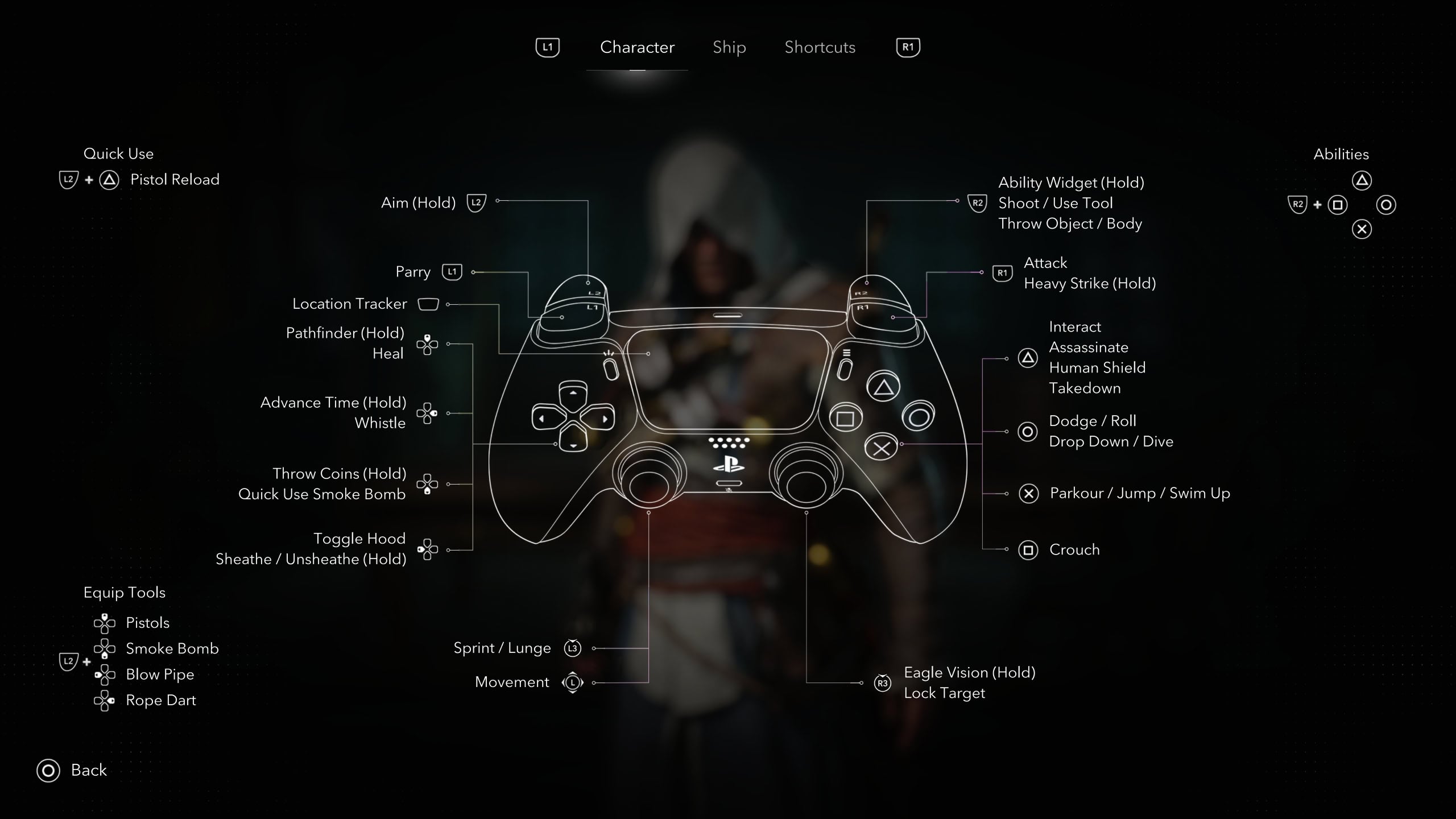
You can find the compare the controller setups in a table format here. You have the ability to rebound the controls to whatever feels comfortable for you.
Character Controls
This screen shows the available controls for movement, combat, and actions available while you’re controlling Edward on foot.
| Action | Xbox | PlayStation | Category | Category 2 |
|---|---|---|---|---|
| Move | LS | LS | Movement | Character |
| Look | RS | RS | Movement | Character |
| Parkour Up / Jump | A | X | Movement | Character |
| Drop Down / Dive | B | ⭘ | Movement | Character |
| Crouch | X | ☐ | Movement | Character |
| Sprint | LS (Press) | L3 | Movement | Character |
| Attack | RB | R1 | Combat | Character |
| Assassinate | Y | △ | Combat | Character |
| Lock Target | RS (Press) | R3 | Combat | Character |
| Parry / Deflect | LB | L1 | Combat | Character |
| Dodge / Roll | B | ⭘ | Combat | Character |
| Human Shield | Y | △ | Combat | Character |
| Takedown | Y | △ | Combat | Character |
| Aim / Ranged Abilities | LT (Hold) | L2 (Hold) | Combat | Character |
| — Shoot / Use Tool | RT | R2 | Combat | Character |
| — Pistol Reload | Y | △ | Combat | Character |
| — Pistols | D-Pad Up | D-Pad Up | Combat | Character |
| — Rope Dart | D-Pad Right | D-Pad Right | Combat | Character |
| — Smoke Bomb | D-Pad Down | D-Pad Down | Combat | Character |
| — Blow Pipe | D-Pad Left | D-Pad Left | Combat | Character |
| Ability Widget | RT | R2 | Combat | Character |
| — Kick | X | ☐ | Combat | Character |
| — Sweep | A | X | Combat | Character |
| — Quick Use Pistols | Y | △ | Combat | Character |
| — Quick Use Rope Dart | B | ⭘ | Combat | Character |
| Interact | Y | △ | Actions | Character |
| Eagle Vision | RS Press (Hold) | R3 (Hold) | Actions | Character |
| Heal | D-Pad Up | D-Pad Up | Actions | Character |
| Pathfinder | D-Pad Up (Hold) | D-Pad Up (Hold) | Actions | Character |
| Quick Use Smoke Bomb | D-Pad Down | D-Pad Down | Actions | Character |
| Throw Coins | D-Pad Down (Hold) | D-Pad Down (Hold) | Actions | Character |
| Whistle | D-Pad Right | D-Pad Right | Actions | Character |
| Advance Time | D-Pad Right (Hold) | D-Pad Right (Hold) | Actions | Character |
| Toggle Hood | D-Pad Left | D-Pad Left | Actions | Character |
| Sheathe / Unsheathe Weapon | D-Pad Left (Hold) | D-Pad Left (Hold) | Actions | Character |
Human Shield is only available when someone is aiming to shoot at you. You can grab a standard enemy to take the shot for you, slitting their throat afterwards regardless if they’ve been shot or not.
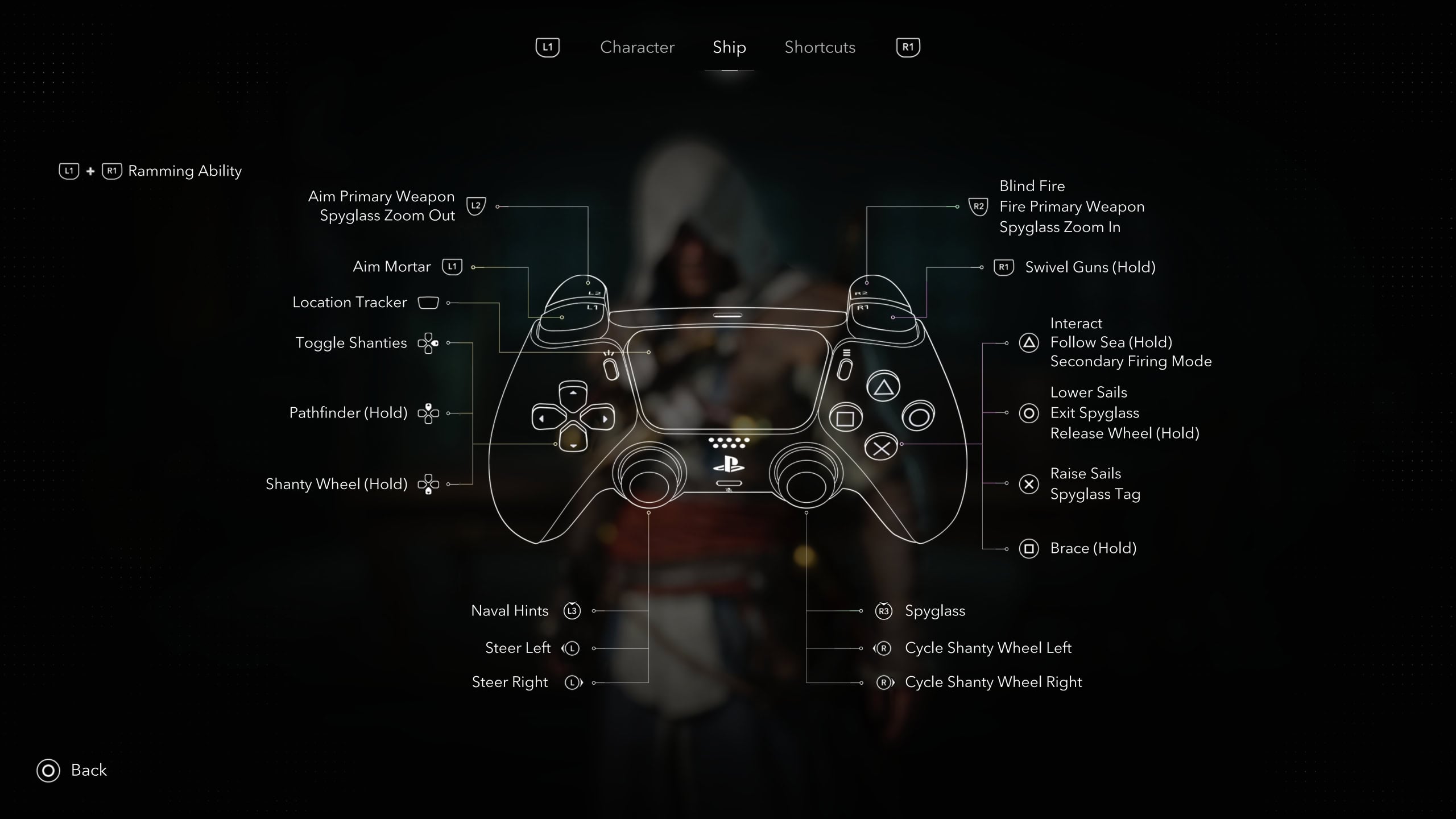
Ship
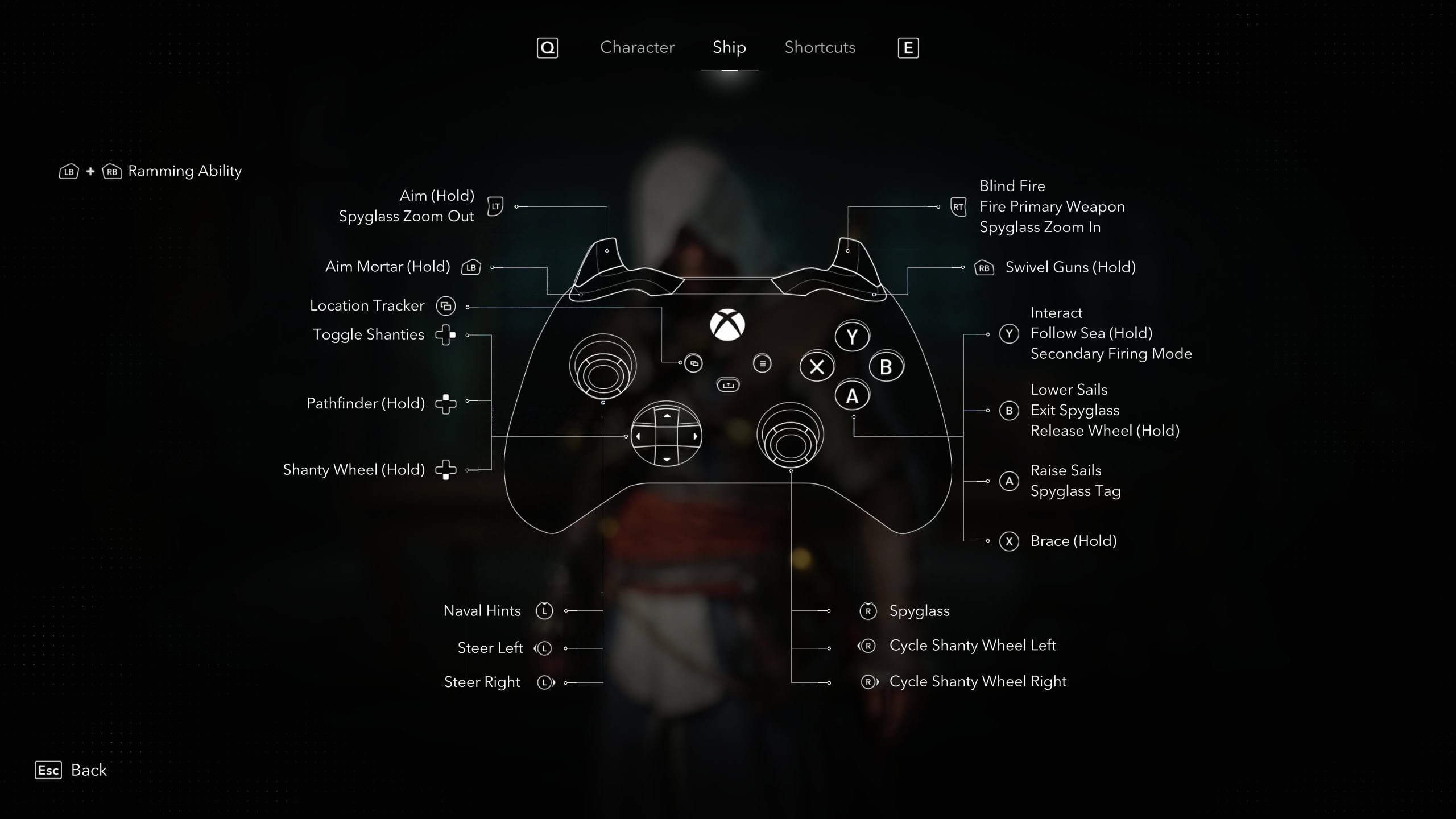
Under most circumstances, these controls will be used when piloting the Jackdaw, Edward Kenway’s brig.
| Action | Xbox | PlayStation | Category | Category 2 |
|---|---|---|---|---|
| Raise Sails | A | X | Movement | Ship |
| Lower Sails | B | ⭘ | Movement | Ship |
| Steer Left | LS Left | LS Left | Movement | Ship |
| Steer Right | LS Right | LS Right | Movement | Ship |
| Aim Primary Weapon | LT (Hold) | L2 (Hold) | Combat | Ship |
| — Fire Primary Weapon | RT | R2 (Hold) | Combat | Ship |
| — Secondary Firing Mode | Y | △ | Combat | Ship |
| Aim Mortar | LB (Hold) | L1 (Hold) | Combat | Ship |
| Use Swivel Gun | RB (Hold) | R1 (Hold) | Combat | Ship |
| Ramming Ability | LB + RB | L1 + R1 | Combat | Ship |
| Brace | X (Hold) | ☐ (Hold) | Combat | Ship |
| Interact | Y | △ | Actions | Ship |
| Pathfinder | D-Pad Up (Hold) | D-Pad Up (Hold) | Actions | Ship |
| — Follow Sea | Y (Hold) | △ (Hold) | Actions | Ship |
| Toggle Shanties | D-Pad Right | D-Pad Right | Actions | Ship |
| Shanty Wheel | D-Pad Down (Hold) | D-Pad Down (Hold) | Actions | Ship |
| — Cycle Shanty Wheel Left | RS Left | RS Left | Actions | Ship |
| — Cycle Shanty Wheel Right | RS Right | RS Right | Actions | Ship |
| Spyglass | RS (Press) | R3 | Actions | Ship |
| — Spyglass Zoom In | RT | R2 | Actions | Ship |
| — Spyglass Zoom Out | LT | L2 | Actions | Ship |
| — Spyglass Tag | A | X | Actions | Ship |
| — Exit Spyglass | B | ⭘ | Actions | Ship |
| Naval Hints | LS (Press) | L3 | Actions | Ship |
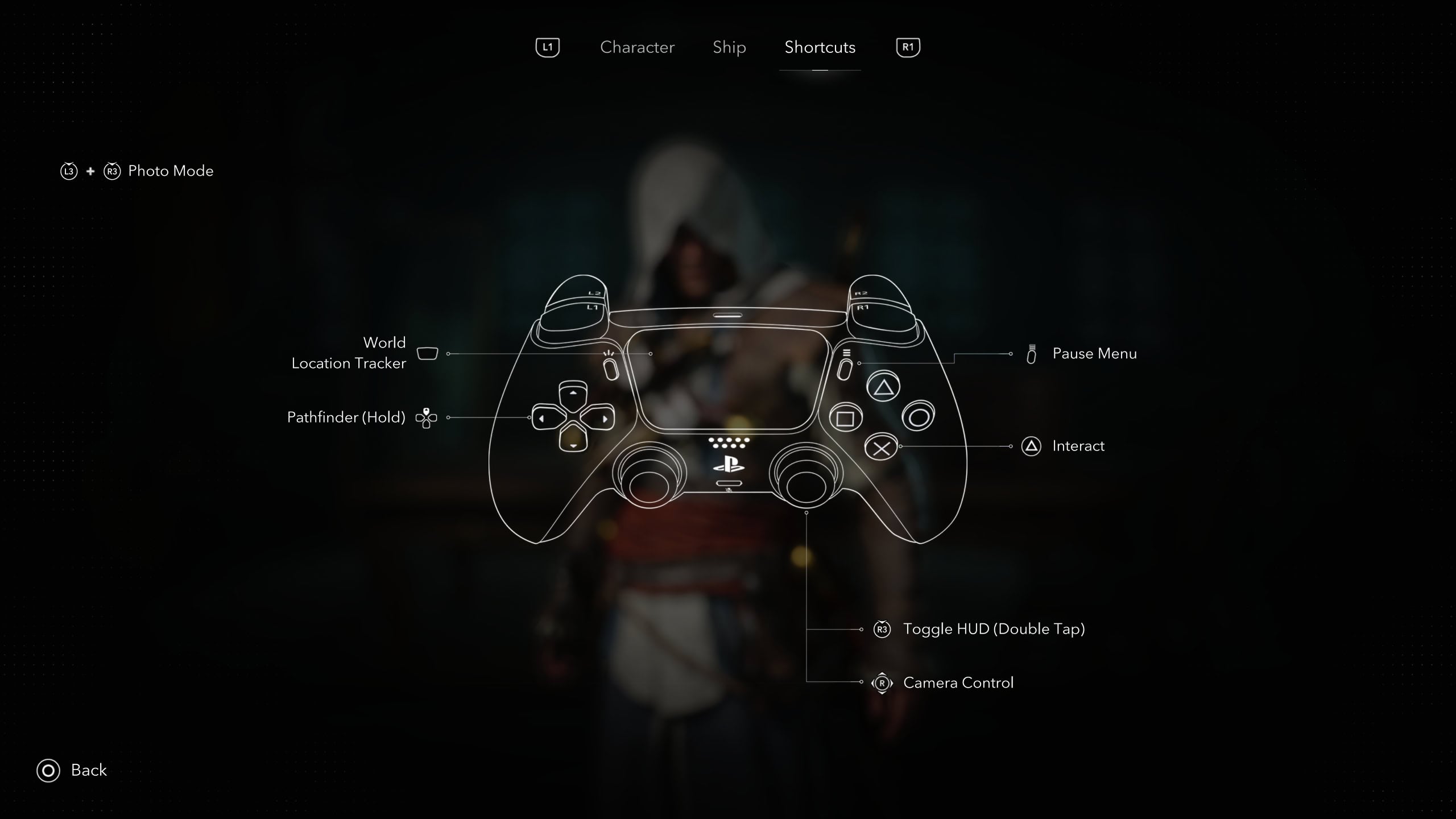
Shortcuts
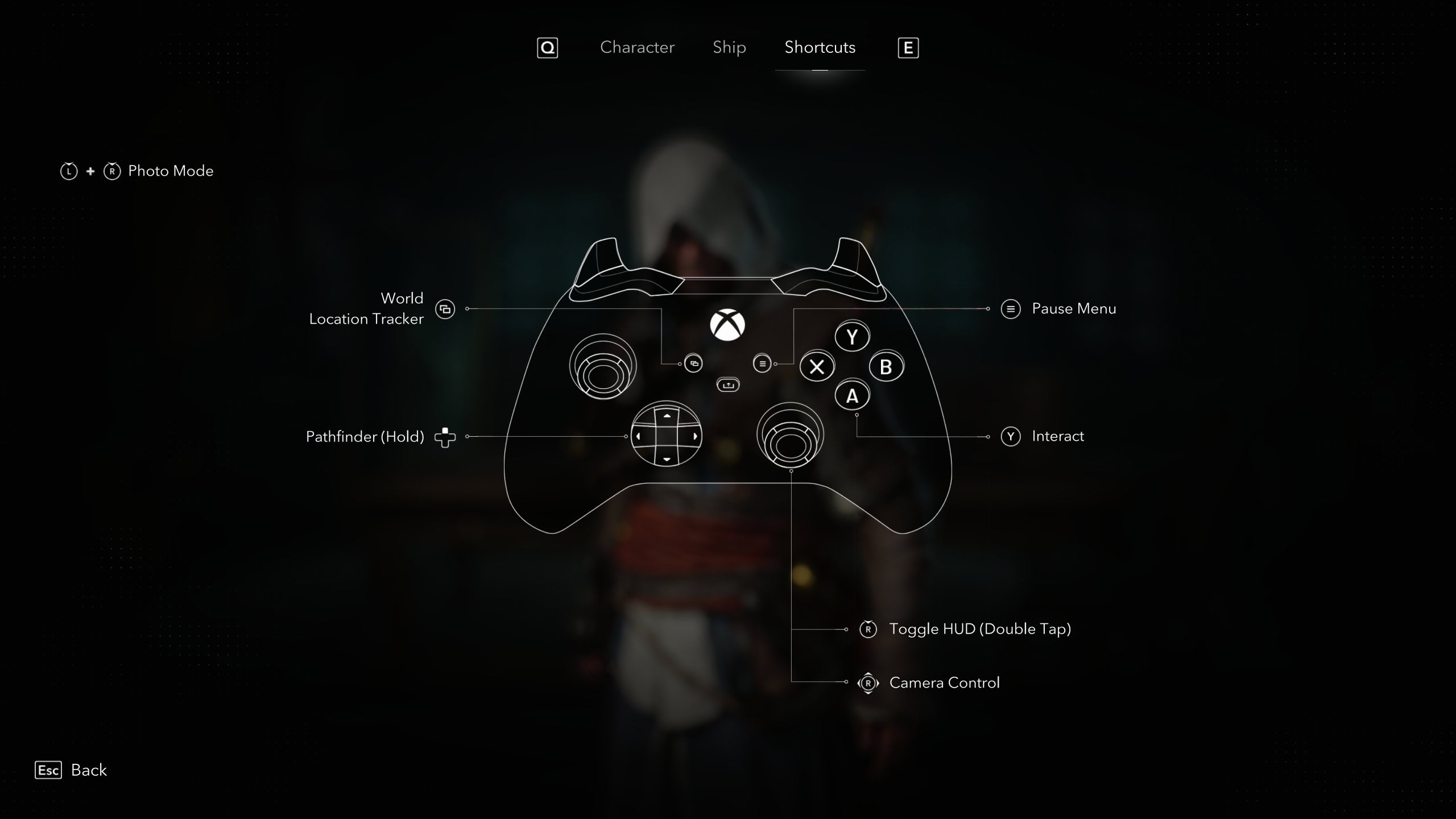
The Shortcut controls is what brings you to the various menus, useful features, and the camera.
| Action | Xbox | PlayStation | Category | Category 2 |
|---|---|---|---|---|
| Interact | Y | △ | General | Shortcuts |
| Pathfinder | D-Pad Up (Hold) | D-Pad Up (Hold) | General | Shortcuts |
| Toggle HUD | RS (Double Tap) | R3 (Double Tap) | General | Shortcuts |
| Photo Mode | LS + RS (Press) | L3 + R3 | General | Shortcuts |
| Camera Up | RS Up | RS Up | Camera | Shortcuts |
| Camera Down | RS Down | RS Down | Camera | Shortcuts |
| Camera Left | RS Left | RS Left | Camera | Shortcuts |
| Camera Right | RS Right | RS Right | Camera | Shortcuts |
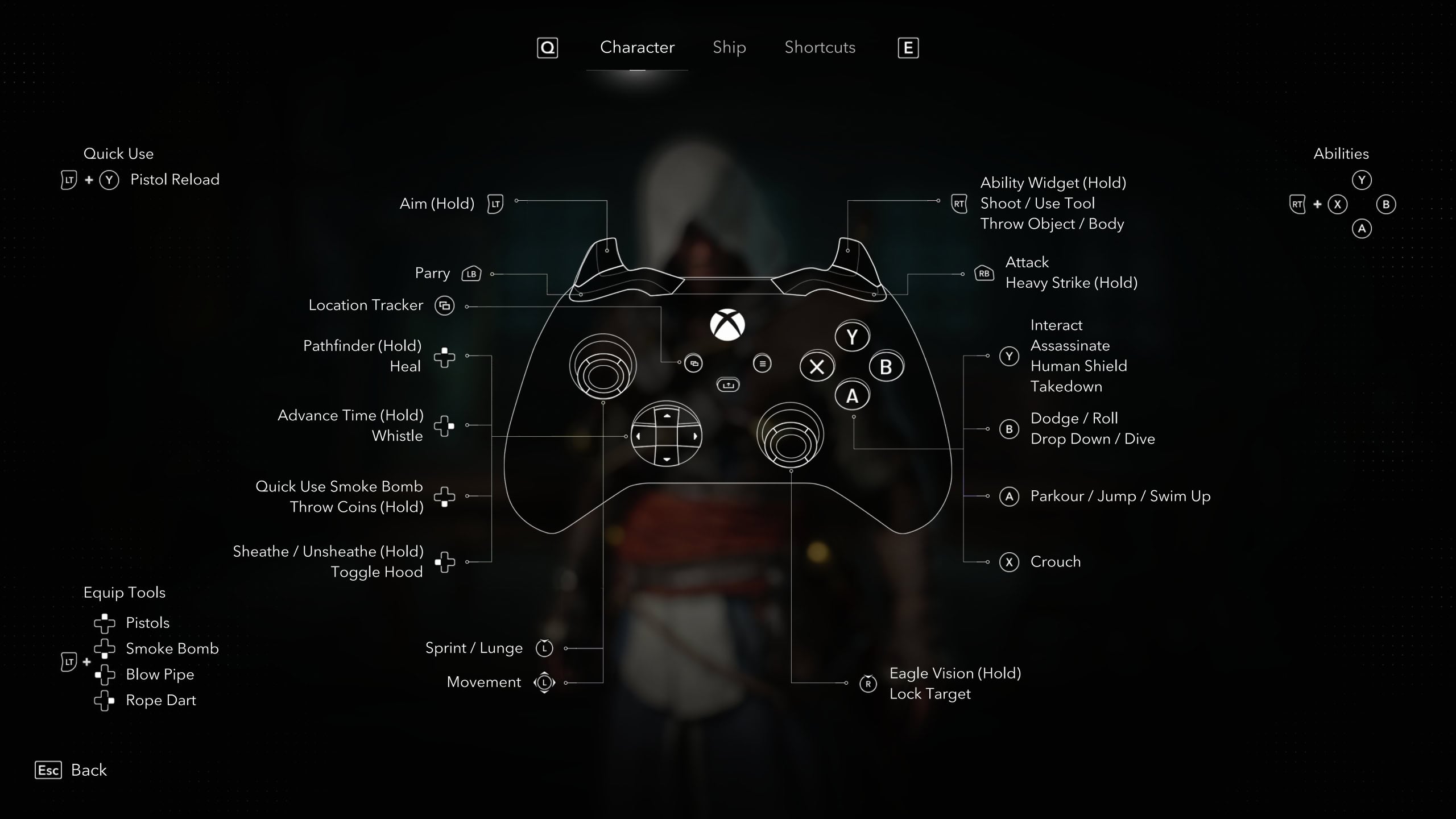
Below are the controls for the Xbox Series S|X controller for Black Flag Resynced
Below are the controls for the Playstation 5 controller for Black Flag Resynced