Pearl Abyss released patch 1.18.00 for Crimson Desert, which adds more options for lock-on camera rotation, new Quests Knowledge hub, and improves the map discovery visuals.
Updated to include the changes from 1.18.01 and 1.18.02.
Patch 1.18 Highlights
There are no new content additions or major system overhauls with patch 1.18.00, but Pearl Abyss has snuck in a few important changes that improve the player’s experience considerably.
Map Discovery Fog nuances
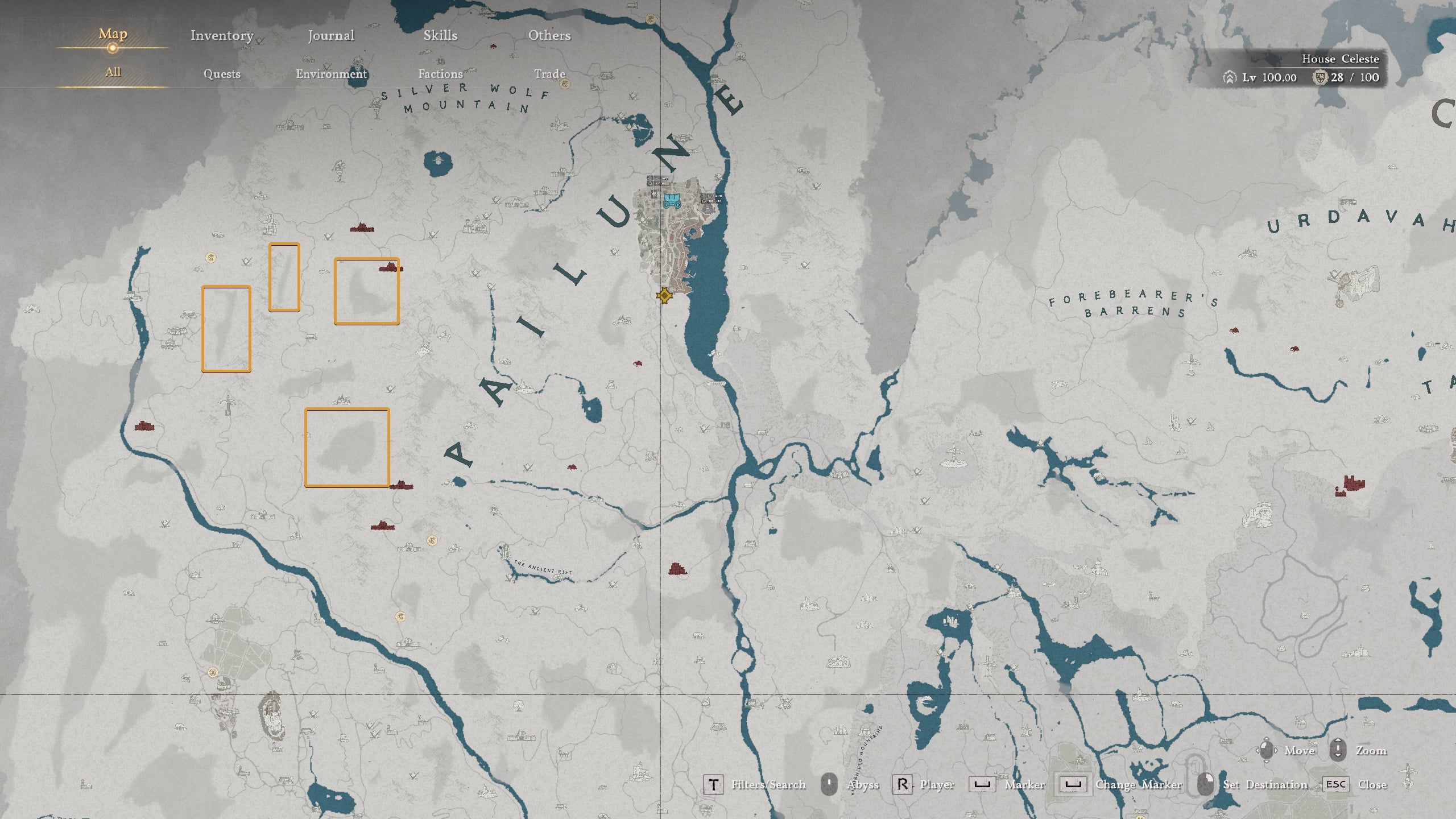
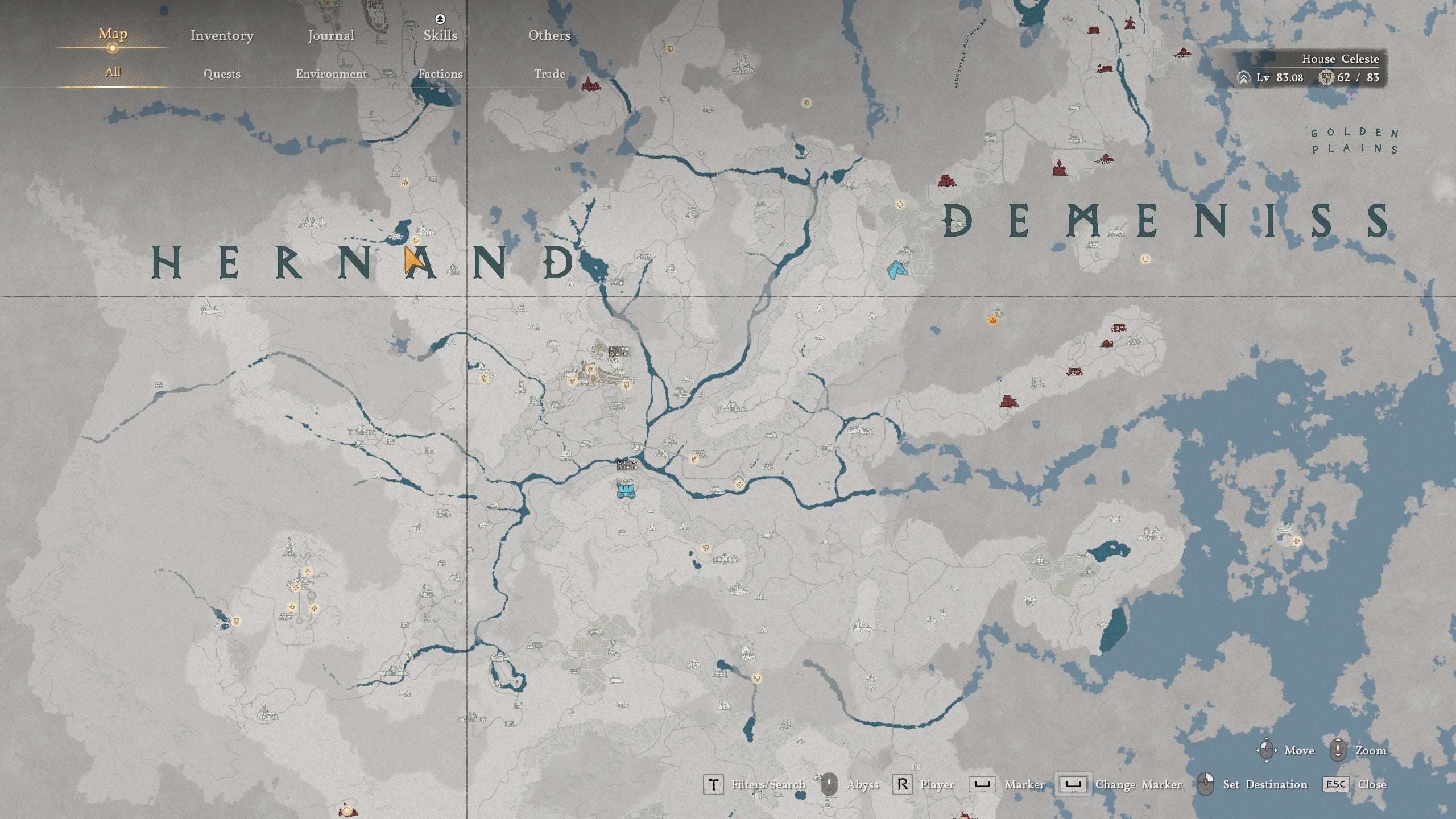
A popular request has been to allow players to see parts of the map they have never been to, even after ringing the bells. This is now possible thanks to a new visually distinctive fog effect.
When you have not yet interacted with the bell in a certain region, the fog will be darker color. If you have interacted with the bell, places you have not yet manually explored, will be marked with a light fog filter.
On the images below:
- Top image: On this fully discovered map, you can see light-colored fog filter marking small pieces of lands my character has not explored personally. Note that I’ve placed gold markers on only a few of the fog elements, to show you what you need to look for.
- Bottom Image: On this map, you can see darker shades of the fog filter indicating that the bell has not been used on the northern regions. Light-colored fog filter displays places I have not manually explored yet after ringing a bell in the southern parts of the map.
Considering the vast amount of side quests and knowledge you can collect in Crimson Desert, this new feature should help a lot so mappers and completionists can fully explore every last corner of Pywel.
New Knowledge category: Quests
The Knowledge UI can help completionist players find what they are missing and hint to them where they should look for it. The new Quests category is another step in improving the navigation and orientation when you are hunting for more knowledge in Crimson Desert.
If you open Main Menu → Journal → Knowledge, and navigate to the bottom, you will see the new Quests category with 8 subcategories:
- Main Quests
- Faction Quests
- Investigation Quests
- Daily Life Quests
- Research Quests
- Guide
- Archive Records
- Constellations
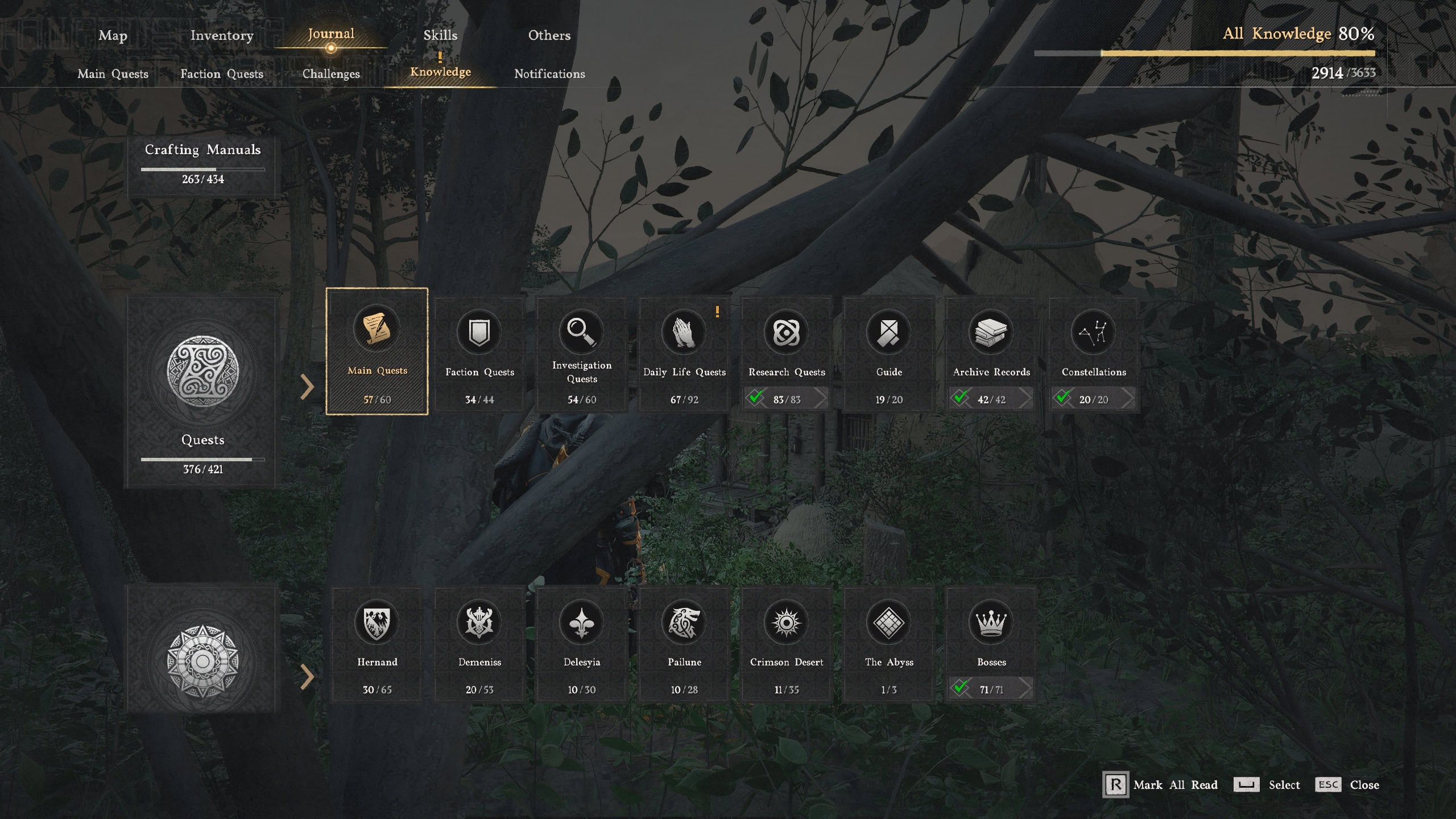
Note that these are not new quests added with 1.18. This is just another UI element to help you find what you have collected so far and what you may be missing in your playthrough.
Research now uses Camp Funds, not Silver
Research is a system in Crimson Desert few players fully explore early on and this is often a mistake, especially if you actually plan to play after you roll the credits.
One of the major road blocks for new players, were the steep prices for more advanced researches. Now in 1.18.00, instead of Silver, you pay with Camp Funds.
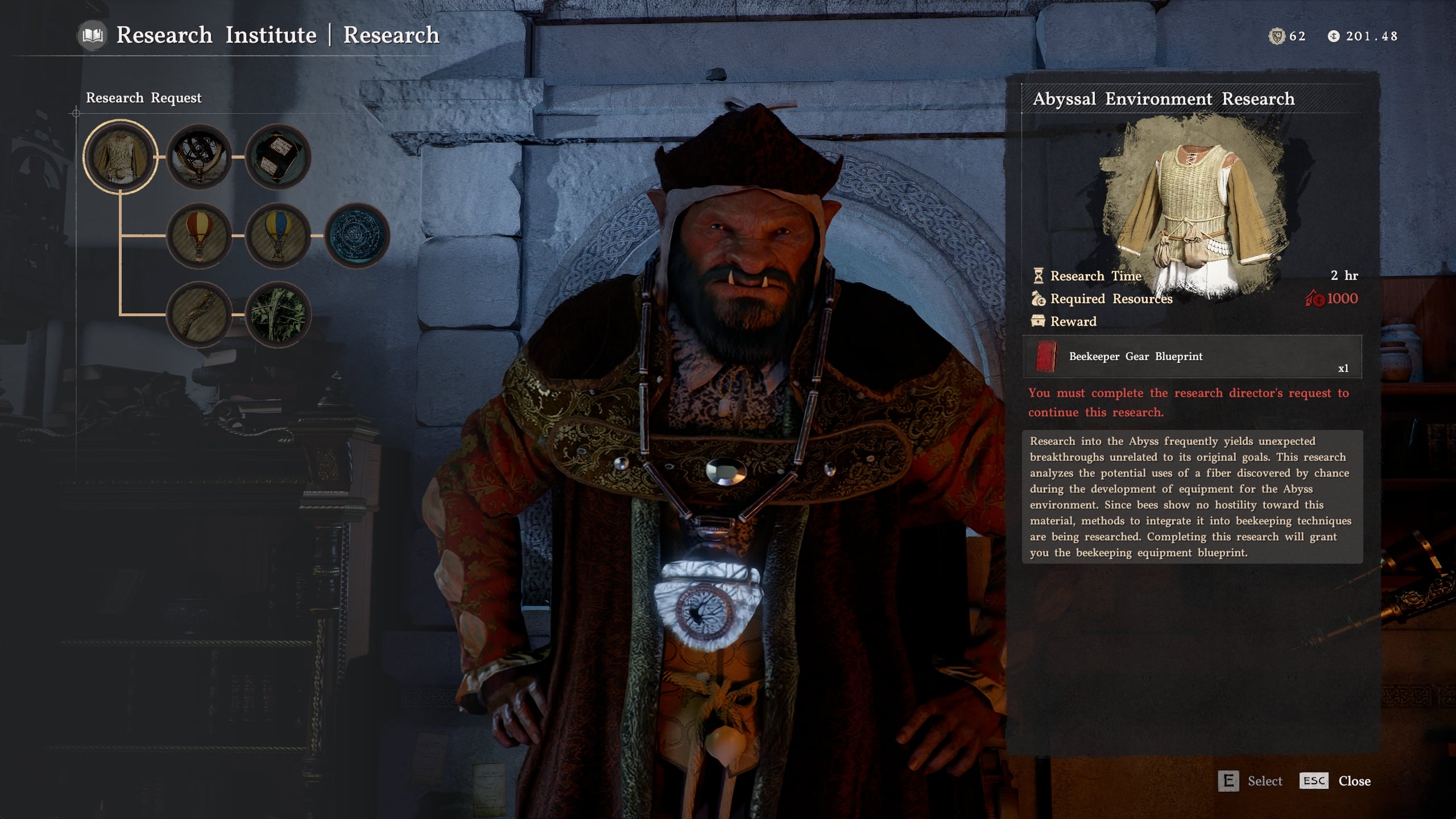
Learning how to manage the Greymane Camp is key for your success and proper progress in Crimson Desert. Acquiring Camp Funds is a crucial part of this system. And now you can use it to pay for Research. Store that precious Silver for more important things such as investing.
Kiln Repair got easier
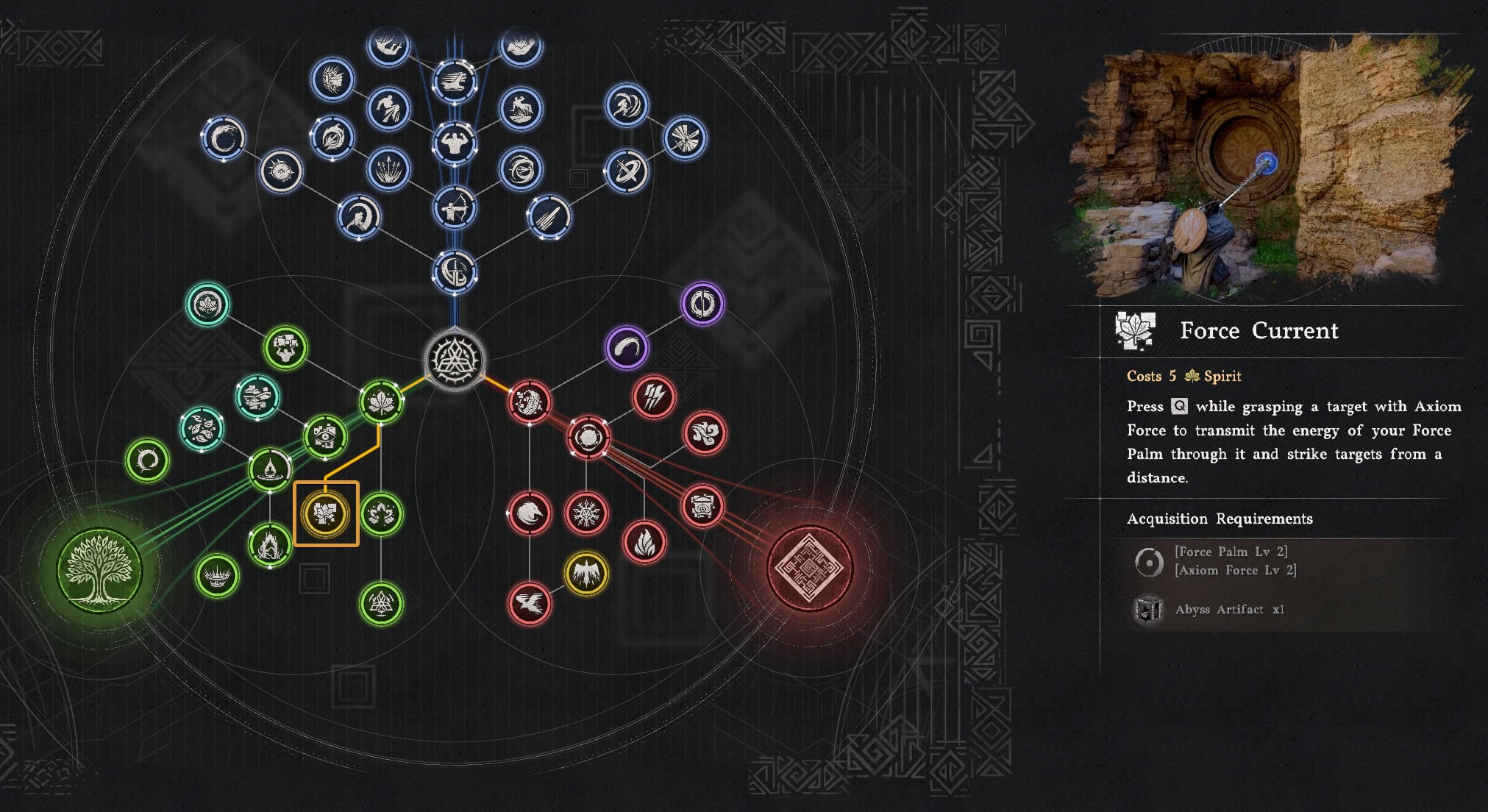
Early on in the game’s main story, you have to repair the Kiln in Chapter IV. The developers went back for this update and made it so you can use Force Current upgrade to Force Palm to reattach the segments to repair the Kiln.
Lock-on Camera Rotation
The Lock-on Camera Rotation feature has been expanded with 1.18.00 and instead of just Enabled or Disabled, it now allows for more flexible customization. You will find this feature in Main Menu → Other → Options Settings → Input.
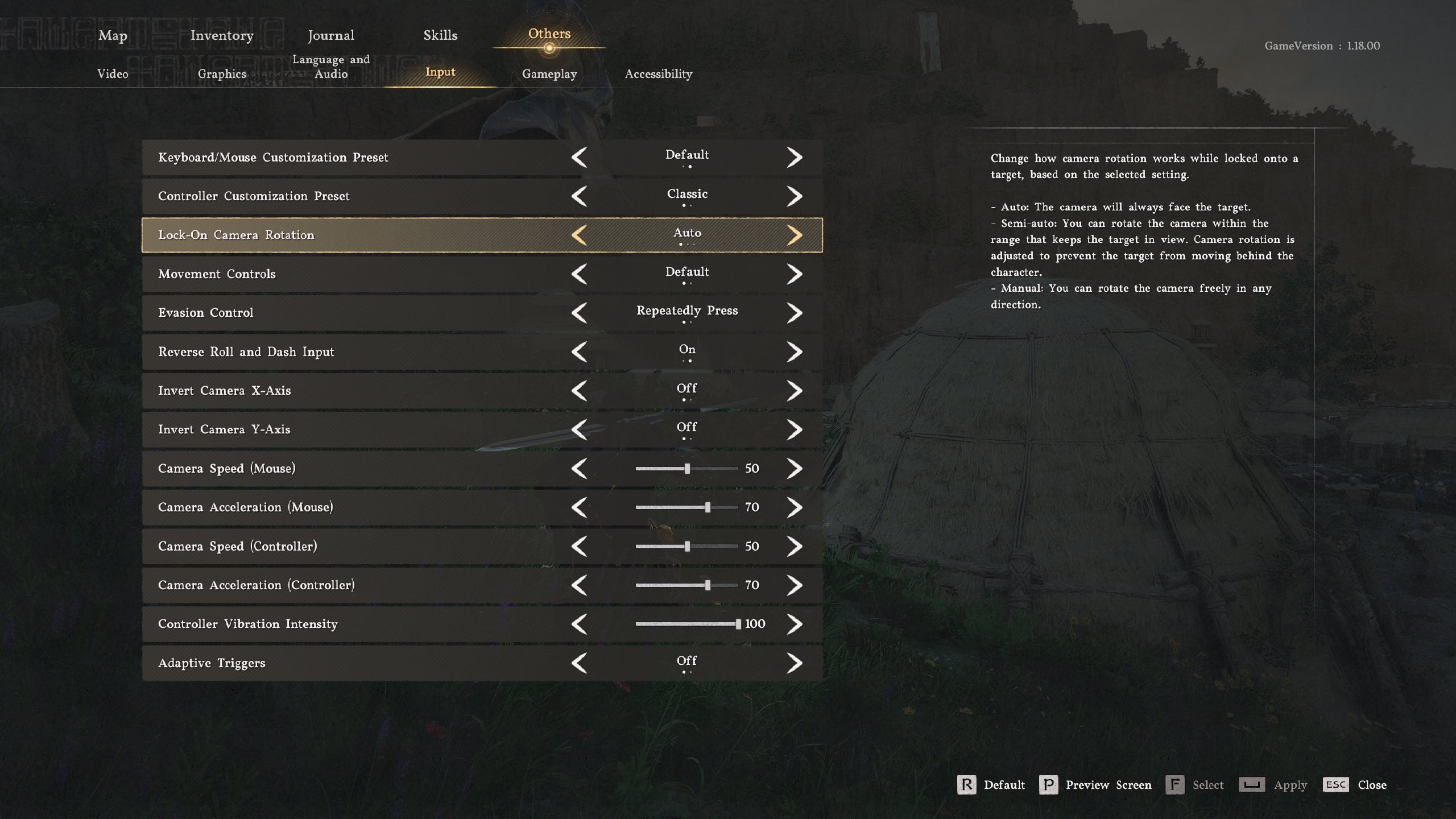
The new settings allow you to do the following:
- Auto: The camera will always face the target. You will not be able to rotate the camera when you have locked it onto a target.Previously, this is what “Disabled” did.
- Semi-auto: This is the new option added with 1.18. When you lock onto a target, you can rotate the camera within a certain range that still keeps the target in view on your screen. This setting prevents the target from moving behind your character.
- Manual: You are allowed to freely rotate the camera in any direction however you please. This was previously what the “Enabled” optino did.
Equip Horse Gear at Stables
When you visit a stable, you will now be able to manage the Horse’s currently equipped gear from the UI. This is a small improvement that may help you with your immersion. It makes perfect sense to add new gear or swap existing one when you visit a stable.
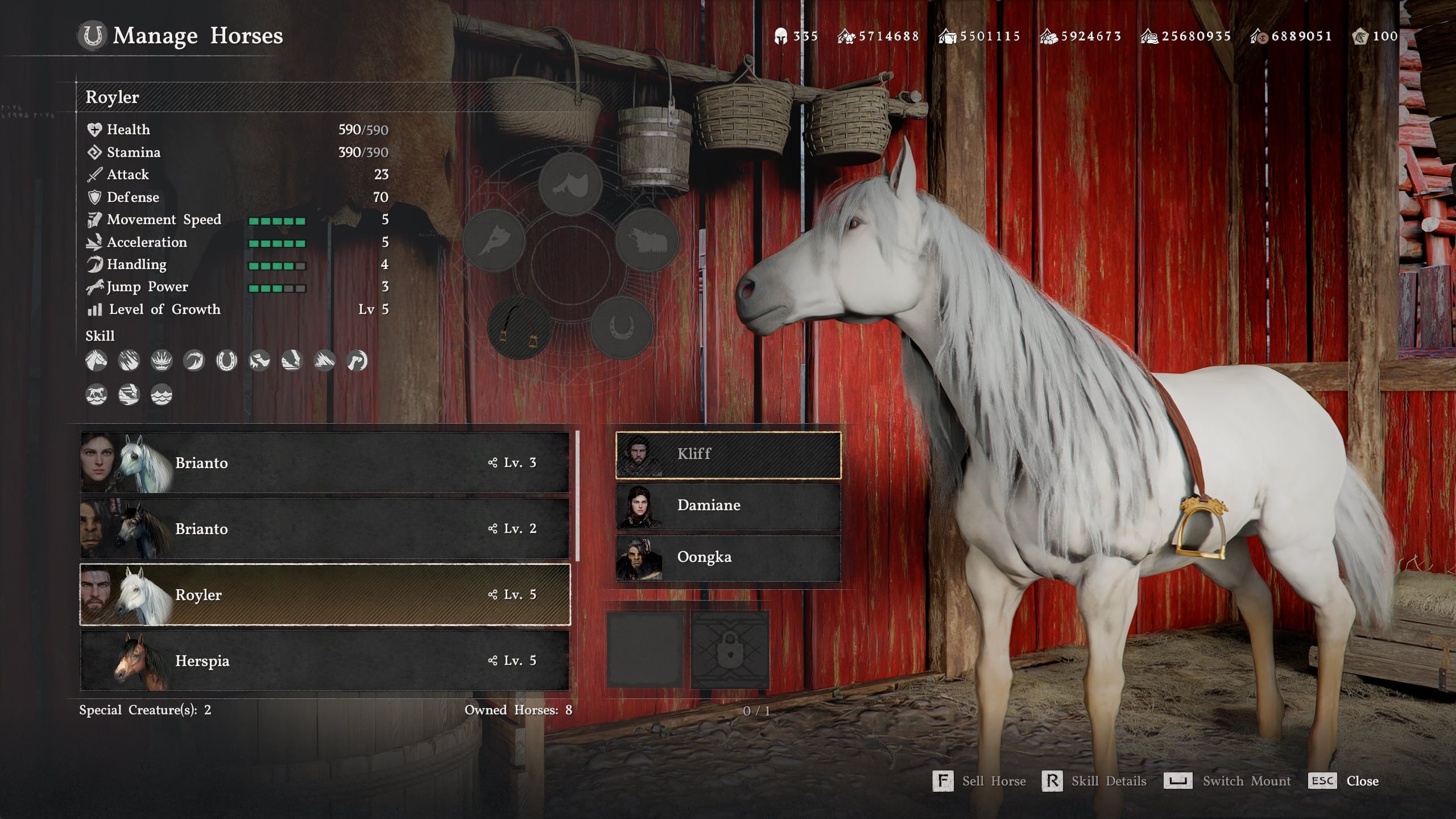
If you horse is not nearby, you can call it, that is not news. But if you have missed the massive Trading and Banking update from patch 1.16.00, you may not be aware that retrieving horses and wagons now costs more.
Update 1.18.00 Patch Notes
Below you can read the full patch notes for Update 1.18.00, released on August 15th, 2026 and sourced from crimsondesert.pearlabyss.com.
Content
- Added “Quests” as a new knowledge category.
- The new category consits of 8 sub-categories: Main Quests, Faction Quests, Investigation Quests, Research Quests, Daily Life Quests, Guide, Archive Records, Constellations.
- Certain quest knowledge entries will be granted retroactively if the corresponding quest has already been completed.
- Changed the resource required for research from silvers to camp funds.
- Fixed an issue where high-value trade goods could be stacked and loaded in quantities of up to 100.
- Fixed an issue where merchants did not appear at trading stalls in certain situations.
- Changed the location of the item “Baker’s Note” from the quest “Haverson’s Request.”
- Improved the knowledge system so that knowledge of certain animals can be gained by picking them up, instead of killing them.
- Improved the wording of certain boss knowledge entries.
- Improved the stable so that horse gear can now be equipped there.
- Fixed an issue where the pensive statue would revert to its unrepaired state in certain situations while progressing through the quest at Jijeong Temple to repair the pensive statues.
- Improved the quest from Chapter 4. The Price of Knowledge > Mysterious Pot > Kiln Repair at the Kilnden Workshop, so that the broken pieces of the kiln can now be reattached using “Force Current.”
- Fixed an issue where the “Defeat the enemies around the cabin” submission did not appear near Cairn House.
- Improved the knowledge system so that the knowledge of “Mysterious Invitation” can be obatined after completing “Read the memory beneath Delesyia Castle.”
Controls
- Added new options for “Lock-on Camera Rotation”.
- “Lock-on Camera Rotation” under Input in the game setting now has three options: manual, semi-auto, auto., where as the previous options were enabled and disabled.
- Manual: When lock-on is enabled, you can rotate the camera using the right stick or mouse. (Previous setting: enabled)
- Semi-auto: when lock-on is enabled, you can rotate the camera using the right stick or mouse within a limited range.
- Auto: When lock-on is enabled, you cannot rotate the camera using the right stick or mouse. (Previous setting: disabled)
- Fixed an issue where you could not lock on to targets with a ranged weapon while riding a mount in certain situations.
- Fixed an issue where the quick slot arrow would move in an unnatural way.
Combat / Action
- Improved an issue where certain special mounts would get stuck when trying to cross low ledges.
- Fixed an issue where the player could not climb through windows even when there were no obstacles.
- Fixed an issue where Sir Catfish would repeatedly perform a specific action in the same location under certain circumstances.
UI
- Improved the map so that areas revealed by ringing the bell can be visually distinguished from areas explored directly.
Graphics / Settings
- Fixed an issue where indoor lighting effects were unstable in certain situations.
- Fixed an issue where the camera would jitter or shake when controlled in low-FPS conditions.
- Fixed an issue where rendering would appear corrupted when FSR Frame Generation or XeSS Frame Generation was enabled on certain low-end graphics cards, including GTX 1060.
Localization
- Fixed various localization errors and improved localization quality across all languages.
Others
- Fixed an issue where the game would occasionally return to the title screen when reviving at a revivival point.
- Fixed an issue where the voice-over for a help pop-up would also play at an increased speed while fast-forwarding through a cutscene.
- Fixed an issue where workers would not function properly after loading a save file.
- Fixed an issue where regular NPCs were placed in blockaded areas.
- Fixed an issue where the animation of a character riding a mount would appear abnormal.
- Fixed an issue where the character would occasionally enter the broken abyss loop in the Abyss Skyloop Bridge.
- Fixed an issue where the time-lapse effect would not be applied after using Focus Mode.
- Fixed an issue where certain equipment would appear to clip through the character.
- Fixed an issue where Aeserion’s movements appeared abnormal.
- Fixed an issue where progression was blocked if the player switched to Oongka before meeting Torstein during “Time to Face Justice.”
- Fixed an issue where multiple oil canisters could be equipped in the same slot when operating the heater.
- Fixed an issue where a shield would be displayed when “Preview Only Selected” was enabled in shops or dyehouses after equipping dual-wielded weapons.
- Fixed an issue where the sound effects of Abyss Gear skills would play even when their volumne was set to 0.
Hotfix 1.18.01 Patch Notes
A small hotfix was released a day after the main patch to resolve a few issues. The most important one was the bug where if you have your lantern on, the start of a dialogue with an NPC was delayed with a few seconds.
- Fixed an issue where speaking to an NPC while the lantern was lit delayed the opening of the interaction menu.
- Fixed an issue where housing items placed in game version 1.12.00 or earlier were not displayed.
- Fixed an issue where the game would unexpectedly close after launching in certain situations.
- Fixed an issue where certain areas were displayed incorrectly on the map.
Hotfix 1.18.02 Patch Notes
A second hotfix was released on Monday, August 17th, 2026. It resolves the issue with comrades count dropping to zero, the bug that may reset your Silver after completing the quest “A Secret Deal” and a few others.
- Fixed an issue where the number of comrades would appear as 0 in the camp resources UI.
- Fixed an issue where the amount of silver in possession would reset after completing the quest “A Secret Deal” in certain save files.
- Fixed an issue where the player’s animation would stutter or appear unnatural while moving.
- Fixed an issue where the character would become unresponsive after using a shop in certain situations.